AI discovery and governance

Shadow AI is already in your organisation. Gain visibility and control.

Aletheon discovers the AI tools in use on your endpoints and in the browser, keeps a continuously updated inventory and rates the risk of each one. Coming soon: blocking personal data in prompts before it is submitted.

Book a demo: aletheon.io/demo

How Aletheon works Telemetry from endpoints and the browser flows into Aletheon, and the risk register lists the tools found. Below, a Hungarian social security (TAJ) number in a prompt is replaced by the [TAJ_1] placeholder. Mac Windows Linux Chrome AI tools ChatGPT (web)▲ High Cursor◆ Medium MCP: shell▲ High Ollama :11434▲ High Claude (web)● Low Coverage Prompt in the browser John Smith’s TAJ number: 123 456 789 [TAJ_1]

Supports compliance with NIS2, DORA, GDPR and the EU AI Act

  • NIS2
  • DORA
  • GDPR
  • EU AI Act

Available as an EU-hosted cloud service or on-premises.

Solution

AI inventory and prompt-level data protection

Bring shadow AI under control

Aletheon Discover

See which AI tools are in use across your organisation and the risk each one carries.

  • Discovers AI desktop applications and web services, browser extensions, coding assistants, CLI agents and locally hosted LLMs.
  • Every tool receives a risk rating, and you decide its status: approved, tolerated or prohibited.
  • Alerts you when a new or high-risk tool appears, and records every decision in the audit log.

Data protection in prompts

Aletheon Guard New

Detects and blocks personal data pasted into a prompt, before it is submitted.

  • Recognises Hungarian identifiers with checksum validation: TAJ (social security) number, personal tax ID, company tax number, IBAN and domestic (GIRO) account numbers, and company registration number.
  • Detection runs locally in the browser; prompt content is not sent to Aletheon’s servers.
  • Blocks the submission or replaces the match with a placeholder such as [TAJ_1].

Use cases

The blind spots you probably have today

Aletheon Discover already covers all of these, using telemetry from your endpoints and browsers.

Who uses which AI tools

AI desktop applications and web services, browser extensions, coding assistants, CLI agents and local LLMs on macOS, Windows and Linux endpoints, and in Chrome.

MCP servers with command execution

Lists the configured MCP servers and flags those that can execute commands on the endpoint. Only the command name is collected, not its arguments or environment variables.

Local LLMs exposed to the network

Alerts you when a local model server (such as Ollama or LM Studio) listens on all network interfaces, making it reachable from any host on the network.

AI API keys stored on endpoints

Flags AI API keys stored in known locations. Only their presence is detected: the key value is not read or transmitted.

Outdated AI software

Compares installed AI applications and SDKs with the latest release and flags outdated versions.

Undocumented decisions

Record whether each tool is approved, tolerated or prohibited. You are alerted to new tools, and every action is traceable in the audit log.

Only AI-related data leaves the endpoint, and each customer’s data is stored in isolation, in the EU.

How it works

From deployment to first results in three steps

  1. Deploy

    A one-line command or an installer package for macOS, Windows and Linux, plus a Chrome extension. Both can be rolled out through your MDM or browser policy.

  2. Discover

    The agent and the extension report hourly. First results typically appear within 15–30 minutes of installation.

  3. Decide and monitor

    Review the risk of each tool and set its status. You are alerted to new tools, and the audit log records who decided what, and when.

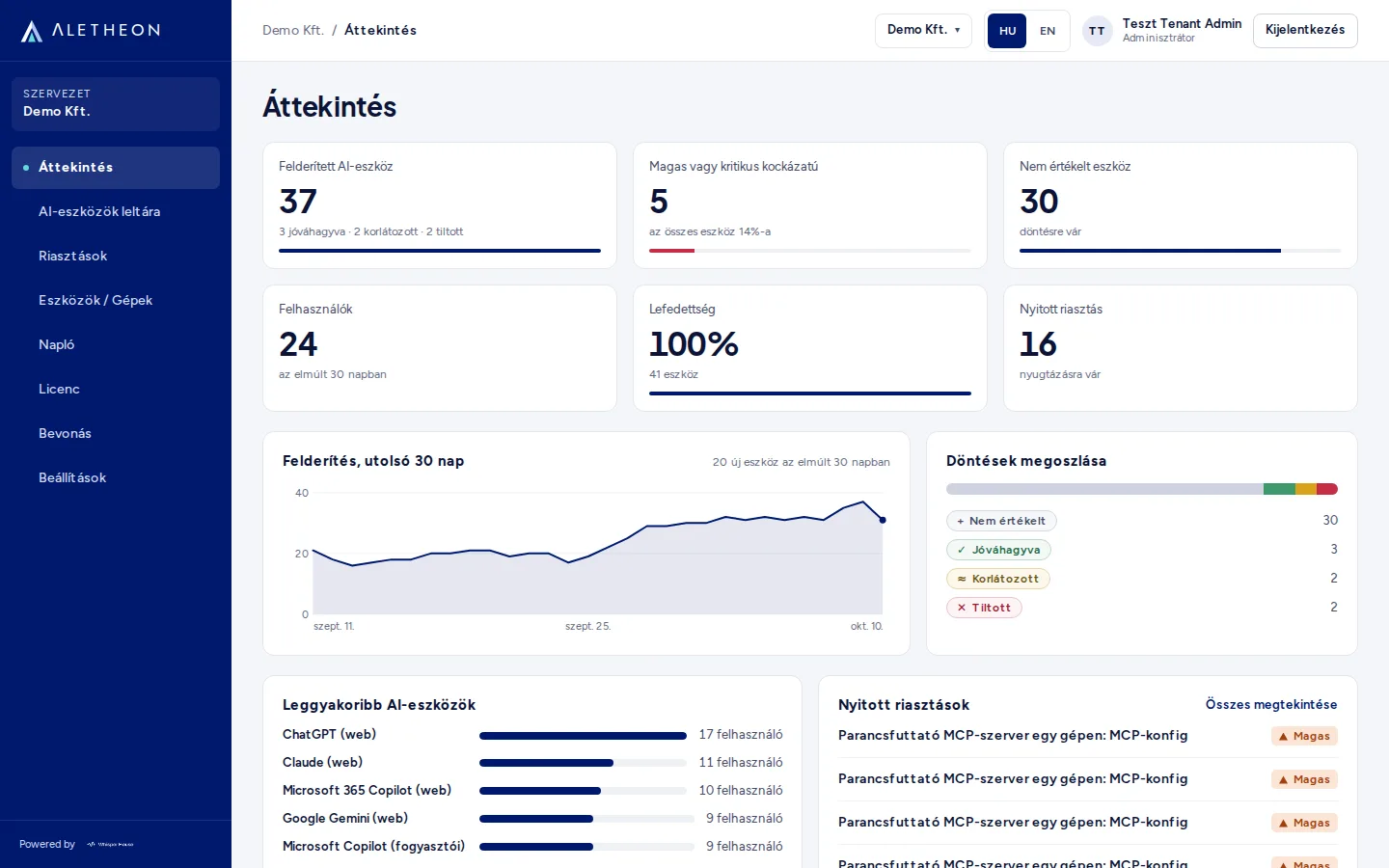
The Aletheon Overview page: 37 discovered AI tools, 5 of them high or critical risk, discovery trends over the last 30 days, the breakdown of decisions and the most frequently used AI tools.
Overview: discovered tools, risk and decisions on a single page.
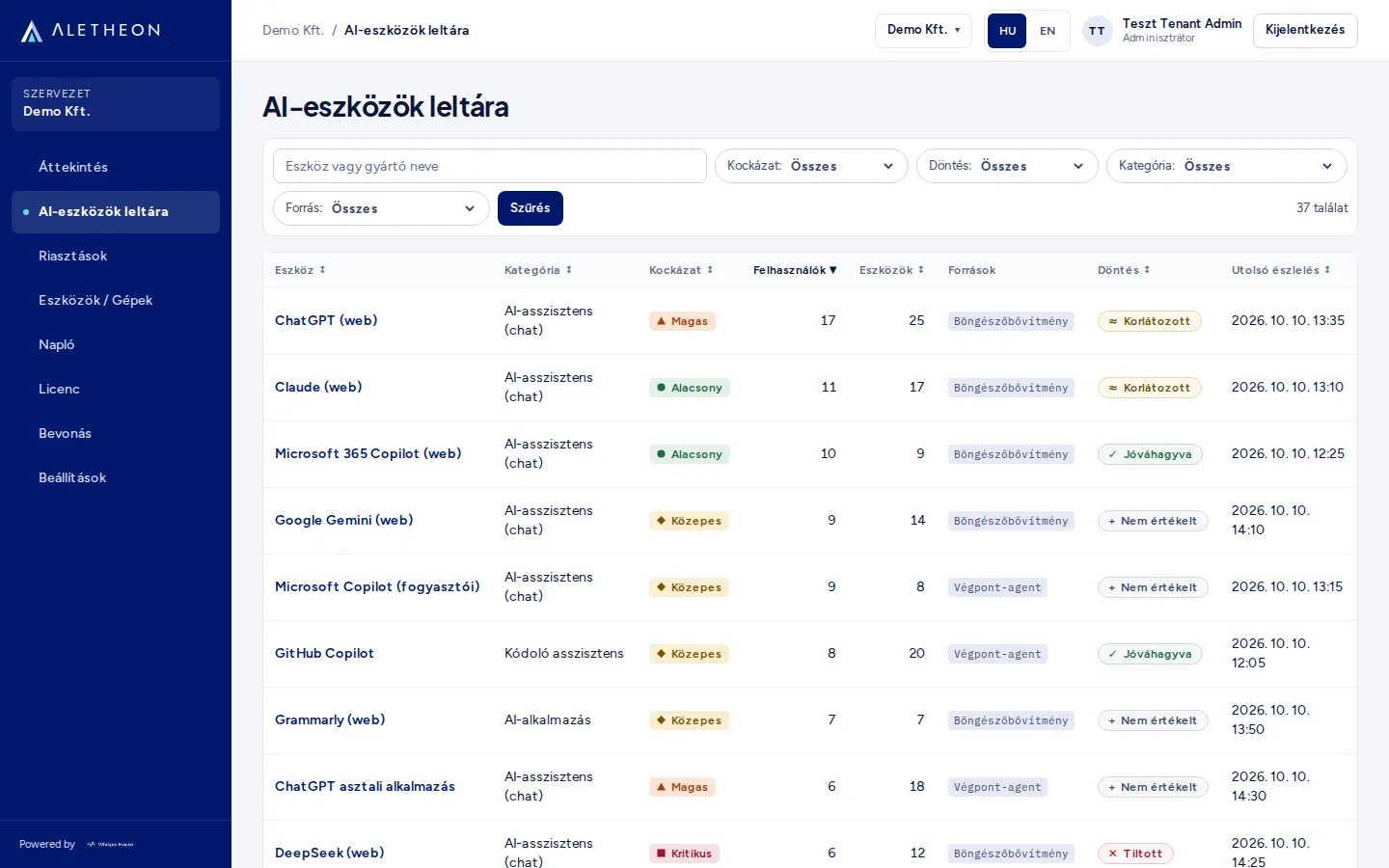
The Aletheon AI tool inventory: category, risk, number of users, source and decision for each tool, for example ChatGPT, Claude, GitHub Copilot and DeepSeek.
AI tool inventory: risk, users and decision for each tool.

The screenshots show fictitious data of a sample organisation (Demo Kft.) in the Hungarian interface.

Compliance

Supports compliance with NIS2, DORA, GDPR and the EU AI Act

These frameworks expect you to know which technologies are in use, assess their risks, document your decisions and keep an audit trail. For AI tools, Aletheon keeps all of this in one place, continuously updated. It supports compliance, but it is not a certification and does not replace legal advice.

FAQ

Frequently asked questions

What data leaves the endpoint?

Only AI-related records. Filtering happens on the endpoint, and the server validates every incoming record again: anything unrelated to AI is discarded before it is stored. API key values, MCP arguments and environment variables are not collected.

Does Aletheon Guard send prompt content anywhere?

No. Detection runs locally in the browser, and prompt content is not sent to Aletheon’s servers. Guard is currently in development; we can discuss rollout timing for your organisation during the demo.

How is it deployed?

A one-line command (macOS, Linux) or an installer package (Windows MSI, macOS pkg, deb, rpm). Packages can be distributed through MDM, and the Chrome extension can be force-installed by policy. First results typically appear within 15–30 minutes.

Is an on-premises deployment available?

Yes. Aletheon is available as an EU-hosted cloud service and on-premises. We discuss on-premises terms and timelines during the demo.

Does Aletheon certify compliance?

No. It provides the inventory, risk classification, decision records and audit log that support your obligations under NIS2, DORA, GDPR and the EU AI Act. Whether your organisation is compliant remains for you and your legal advisers to determine.

Where is the data stored?

Aletheon Cloud is hosted in the EU. Each customer’s data is kept in a separate tenant, isolated at the database level, and no other customer can access it.

Book a demo: aletheon.io/demo

We will walk you through Aletheon using a sample organisation’s data and discuss how it would fit your environment.

  • About 30 minutes, no obligation.
  • We will get back to you within 1–2 business days with a proposed time.
  • We use your data only to arrange the demo, and delete it after 12 months.